0 Your Cart $0.00

Cart (0)

No products in the cart.

Admin Utility Settings

$6.00   $6.00
(Excluding VAT 14.5%)

Admin Utility Settings is an essential toolkit designed to supercharge your Botble CMS experience. Are your settings scattered across multiple menus? Do you want a single, unified dashboard to manage your system-wide configurations? This plugin is the ultimate solution, providing administrators and developers a centralized hub to fine-tune system behaviors, date/time formats, and UI elements with absolute ease.

In stock

Need Update?


Need Support?

SKU: SH-10226-LOBCN
Categories: Plugins, Botble Plugins
Instant Delivery
Instant Delivery
For all digital products
24/7 Dedicated Support
Anywhere & anytime
Secure Payment
Secure Payment
Guarantee secure payments

Admin Utility Settings is an essential toolkit designed to supercharge your Botble CMS experience. Are your settings scattered across multiple menus? Do you want a single, unified dashboard to manage your system-wide configurations? This plugin is the ultimate solution, providing administrators and developers a centralized hub to fine-tune system behaviors, date/time formats, and UI elements with absolute ease.

Why Buy This Plugin? (The Motive)

The primary motive of this plugin is to bring Efficiency, Organization, and Control back to store owners and administrators. Natively, some utility settings can be time-consuming to track down. This plugin solves this by grouping critical utilities together on a single, easy-to-use page.

Instead of wasting time navigating through endless menus to change a simple date format or system preference, the Admin Utility Settings plugin puts everything right at your fingertips. It saves you time and clicks, leading to a much cleaner and faster administration workflow!
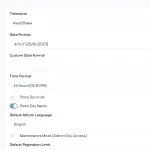
  • 🗓️ Date & Time Mastery: Instantly configure system-wide date formats and timezones from a dedicated screen.
  • ⚙️ System Optimization: Quick, instant access to system-level settings and utility toggles.
  • 🎨 UI Customization: Fine-tune core admin panel appearance options for a smoother user experience.
  • 🔗 Unified Dashboard: End the hunt! Manage all critical but scattered core utilities in one logical, beautifully tabbed place.

How to Use

Using the Admin Utility Settings plugin is incredibly straightforward and beginner-friendly. You do not need any coding knowledge to use it:

  1. Install & Activate: Upload the plugin via your Botble Admin Panel (Plugins -> Add New -> Upload) and click Activate.
  2. Navigate: Go to your Admin Panel -> Settings -> Utility Settings.
  3. Configure: Explore the dynamically organized tabs (General, Date/Time, Advanced) and adjust the values to fit your exact system needs.
  4. Save: Click save, and your changes will instantly apply globally across your entire Botble website.

Requirements

  • Botble Core: Version 7.0.0 or higher
  • PHP: Version 8.1 or higher

Ready to take full control of your Botble CMS workflow?
Get the Admin Utility Settings plugin today and save hours of administrative frustration!

Product Name Admin Utility Settings
Version 1.0.4
File Type zip
Last Updated 13/04/2026
Compatible Browsers Google Chrome, Mozilla Firefox, Microsoft Edge, Safari, Opera

Add your review

Your email address will not be published. Required fields are marked *

Please login to write review!

Looks like there are no reviews yet.

Admin Utility Settings is a centralized toolkit for Botble CMS that brings scattered system configurations into one unified dashboard, making it much easier to manage settings without navigating multiple menus.

It reduces the time spent searching for settings by grouping important system controls like date formats, UI tweaks, and advanced options into a single, well-organized interface, helping admins work faster and more efficiently.

Yes, the plugin provides a dedicated section where you can configure system-wide date formats and timezone settings, and the changes are applied instantly across the entire website.

Absolutely. The interface is simple and user-friendly, with clearly organized tabs like General, Date/Time, and Advanced, so even non-technical users can easily configure settings without coding knowledge.

Yes, it includes options to fine-tune the admin panel’s appearance and behavior, helping create a smoother and more personalized user experience.

Yes, once you click save, all changes are applied globally in real-time without requiring any extra steps or reloads.

No, installation and usage are straightforward. Just install, activate, navigate to the settings page, and adjust options as needed.

Related products

Live Chat Online

Hi there! How can we help you today?

Glad you’re here.