0 Your Cart $0.00

Cart (0)

No products in the cart.

SH Weather Dashboard

$1.00   $1.00
(Excluding VAT 14.5%)

Weather Dashboard brings the elements to your admin panel. This sophisticated plugin provides real-time weather updates and a detailed 7-day forecast directly on your Botble CMS dashboard. Perfect for site owners who need to keep local or global conditions in mind, it combines utility with a beautiful, modern interface.

In stock

Need Update?


Need Support?

SKU: SH-29441-UZJUK
Categories: Plugins, Botble Plugins
Instant Delivery
Instant Delivery
For all digital products
24/7 Dedicated Support
Anywhere & anytime
Secure Payment
Secure Payment
Guarantee secure payments

Weather Dashboard - Real-Time Meteorological Data for Botble CMS

Weather Dashboard brings the elements to your admin panel. This sophisticated plugin provides real-time weather updates and a detailed 7-day forecast directly on your Botble CMS dashboard. Perfect for site owners who need to keep local or global conditions in mind, it combines utility with a beautiful, modern interface.

Premium Features

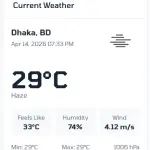
  • Real-Time Weather Updates: Get instant data on temperature, humidity, and atmospheric conditions.
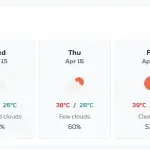
  • 7-Day Forecast: Detailed daily forecasts to help you plan your week ahead.
  • Location-Based Data: Automatically detects or allows manual entry for any global location.
  • Dynamic Visuals: Beautiful weather icons and background themes that change based on current conditions.
  • Admin Dashboard Widget: A perfectly sized, high-impact widget designed for the Botble layout.
  • Ultra Fast API: Optimized for speed to ensure your dashboard loads instantly.

Preview

A stunning, high-contrast dashboard widget featuring large temperature typography, animated weather icons (sun, rain, clouds), and a clean horizontal scroll for the 7-day forecast.

Requirements

  • Botble Core: Version 7.0.0 or higher.
  • Weather API Key: Required (e.g., OpenWeatherMap).
  • PHP: 8.1 or higher.

Installation

1. Automatic Installation

  1. Go to your Admin Panel -> Plugins -> Add New Plugin.
  2. Search for Weather Dashboard.
  3. Click Install, then Activate.

2. Manual Installation

  1. Download the plugin from the marketplace.
  2. Upload the weather-dashboard folder to platform/plugins/.
  3. Go to Admin Panel > Plugins and click Activate.

How to Use

  1. Obtain a free API Key from OpenWeatherMap.
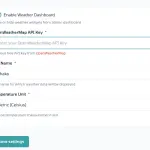
  2. Navigate to Admin Panel -> Settings -> Weather Dashboard.
  3. Enter your API Key and your preferred Location.
  4. The Weather Dashboard widget will now appear on your main dashboard screen.
  5. Hover over the forecast days for more detailed meteorological information.
Product Name SH Weather Dashboard
Version 1.1.1
File Type zip
Last Updated 13/04/2026
Compatible Browsers Google Chrome, Mozilla Firefox, Microsoft Edge, Safari, Opera
Framework Laravel
Programming Language PHP
Required Software Botble
PHP Version 8.1+
Framework Laravel 10+
Database MySQL 8+
Minimum Browser Version Chrome 90+
JavaScript Enabled

Add your review

Your email address will not be published. Required fields are marked *

Please login to write review!

Looks like there are no reviews yet.

Weather Dashboard is a plugin for Botble CMS that displays real-time weather updates and a 7-day forecast directly on your admin dashboard.

Yes, it provides real-time information such as temperature, humidity, and atmospheric conditions using a weather API like OpenWeatherMap.

Yes, the plugin supports location-based data. It can automatically detect your location or allow you to manually set any city worldwide.

It includes a detailed 7-day forecast, helping you plan ahead with daily weather insights directly from your dashboard.

Yes, it features dynamic visuals with changing weather icons and backgrounds based on current conditions, creating a modern and engaging dashboard experience.

No, the plugin is optimized for performance and uses fast API calls to ensure your dashboard loads quickly without delays.

Yes, you need to get an API key from a weather service and enter it in the plugin settings along with your preferred location.

Related products

Live Chat Online

Hi there! How can we help you today?

Glad you’re here.