
Hi there! How can we help you today?
-21% New
Recent
Browse categories
Publish your services, manage staff schedules, take bookings around the clock, collect payments and keep customers informed automatically.
$49.00
$59.00
Save $10.00(Excluding VAT 14.5%)

Instant Delivery
For all digital products

24/7 Dedicated Support
Anywhere & anytime

Secure Payment
Guarantee secure payments
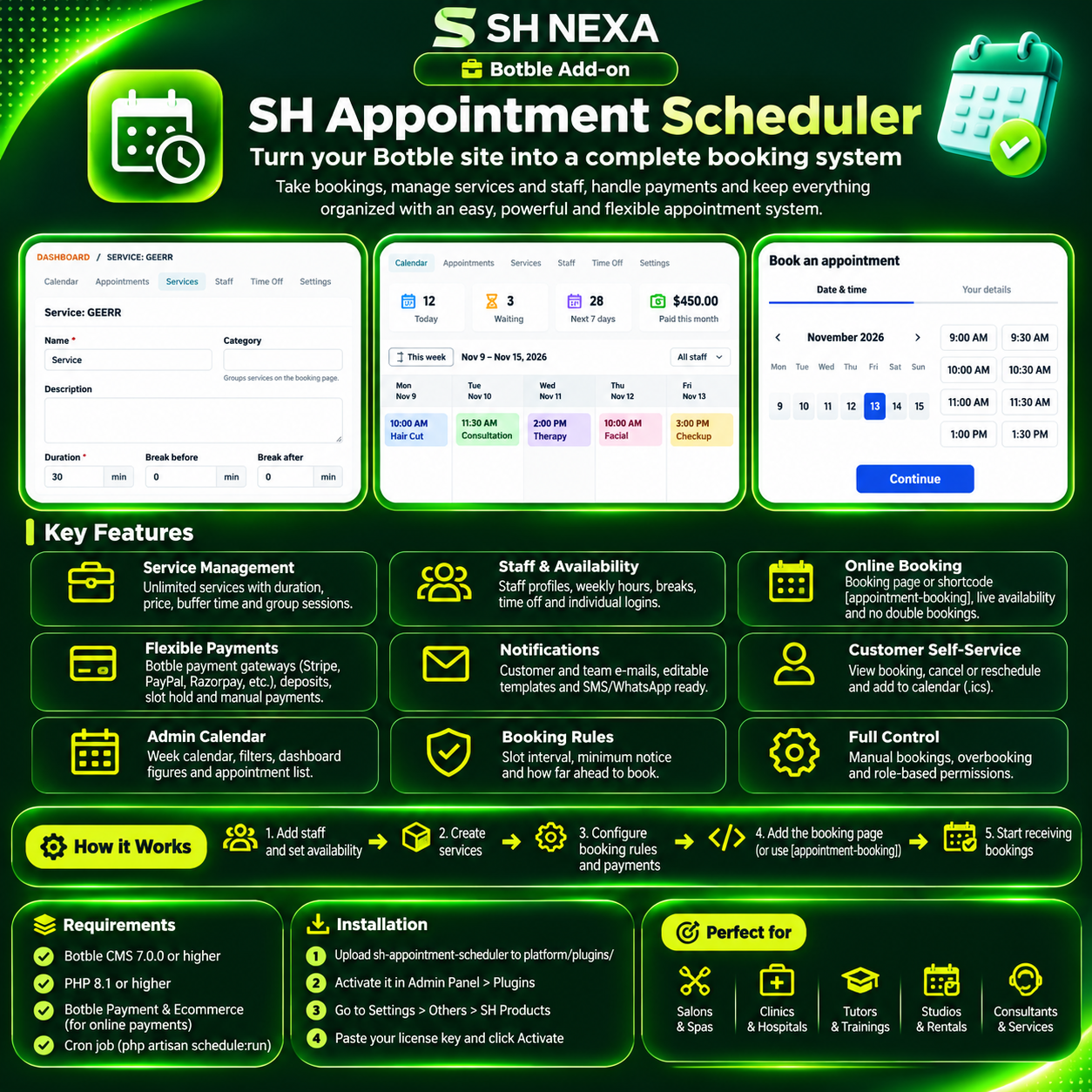
SH Appointment Scheduler turns your Botble website into a complete booking system for salons, clinics, consultants, studios, tutors, repair shops, rentals and any business that works by appointment.
Customers pick a service, a staff member (or "anyone available"), a free day and time, and book in a few clicks. You manage everything from a week calendar in the admin panel.
| Botble core | PHP |
|---|---|
| 7.0.0 or higher | 8.1 or higher |
| Feature | What it does |
|---|---|
| Unlimited services | Name, category, description, image, duration and price. |
| Buffer times | Block preparation or cleaning time before and after each booking. |
| Group sessions | Several customers per time slot for classes, workshops and tours. |
| Flexible payment | Per service: pay at the appointment, full payment online, deposit online, or let the customer choose. |
| Feature | What it does |
|---|---|
| Staff profiles | Photo, bio, contact details and the services each person offers. |
| Weekly hours with breaks | For example 09:00-12:00, 13:00-17:00, set per weekday. |
| Time off and holidays | Block days for one person or close the whole business. |
| Staff logins | Link a staff member to an admin user so they see only their own appointments. |
| Booking rules | Slot interval, minimum notice, how far ahead customers can book. |
| Feature | What it does |
|---|---|
| Booking page | A ready booking page at /booking (address can be changed). |
| Shortcode | [appointment-booking] places the booking form on any page, for one service, one staff member or one category. |
| Live availability | Customers only see days and times that are really free. |
| No double bookings | Each booking is checked again and locked at the moment it is saved. |
| Works in any theme | Responsive, keyboard friendly, no extra libraries. |
| Spam protection | Rate limiting and a hidden honeypot field. |
| Feature | What it does |
|---|---|
| Botble Payment | Stripe, PayPal, Razorpay, Paystack, SSLCommerz, bank transfer and any installed gateway plugin. |
| Deposits | Take a percentage online and the rest at the appointment. |
| Slot hold | Unpaid online bookings hold the time for a set number of minutes, then release it. |
| Manual payments | Record cash or card-terminal payments in the admin panel. |
| Feature | What it does |
|---|---|
| Customer e-mails | Booking received, confirmed, moved, cancelled and reminder. |
| Team e-mails | New, moved and cancelled bookings to your team and the staff member. |
| Editable templates | All e-mails can be changed in Settings > E-mail. |
| SMS ready | Every notification fires an event that SMS and WhatsApp plugins can use. |
| Feature | What it does |
|---|---|
| Personal booking page | A private link in every e-mail to view the booking. |
| Cancel and reschedule | Online, up to a deadline you set. |
| Add to calendar | Download an .ics file for Google Calendar, Outlook and Apple Calendar. |
| Feature | What it does |
|---|---|
| Week calendar | All appointments per day, colour-coded by service, filter by staff. |
| Dashboard figures | Today, waiting for confirmation, next 7 days, paid this month. |
| Appointment list | Search by name, e-mail, phone or booking code; filter by status, staff, service and date. |
| Manual bookings | Book phone and walk-in customers with a free-time finder; overbook when you need to. |
| Permissions | Separate rights for appointments, services, staff and settings. |
php artisan schedule:run every minute)sh-appointment-scheduler folder to platform/plugins/.Full setup steps are in INSTALL.md.
/booking) or add [appointment-booking][/appointment-booking] to any page.| Product Name | SH Appointment Scheduler |
| Version | 1.0.0 |
| File Type | zip |
| Last Updated | 11/11/2026 |
| Compatible Browsers | Google Chrome, Mozilla Firefox, Microsoft Edge, Safari, Opera |
| Framework | Laravel |
| Programming Language | PHP |
| Required Software | PHP, Node.js |
| PHP Version | 8.1+ |
| Framework | Laravel 10+ |
| Database | MySQL 8+ |
| Server Type | Apache / Nginx |
| SSL Certificate | |
| Cron Job Required | |
| File Permissions | 755 / 777 |
| Minimum Browser Version | Chrome 90+ |
| JavaScript Enabled |
Your email address will not be published. Required fields are marked *
Please login to write review!
Looks like there are no reviews yet.
SH Appointment Scheduler
$49.00
Instant Delivery
For all digital products

Smart Eco System
Maintaining your ecosystem
100% Secure Payment
Guarantee secure payments
24/7 Dedicated Support
Anywhere & anytime

Daily Offers
Discount up to 45% OFF
Hi there! How can we help you today?
Free call from your browser. No app needed.
Cookie preferences